How to Make a Talking Minecraft Villager: Text, Covers and Meme Clips
Published: · Updated:
Want it now? Open the Minecraft Villager AI voice generator and type a line.
Minecraft villagers never say a word in the game, only “hmm”, which is exactly why a talking villager is such a popular meme voice.
This guide makes one in five steps, with text, your own recording or a song.
We reviewed the Voicestars AI Minecraft Villager voice page and the Minecraft Wiki villager page on 19 November 2026.
Make the villager say your line
AI Minecraft Villager is preselected. Type a short line, or upload your own recording.
In short
Write a short line with a few “hmm” sounds, type it on an AI Minecraft Villager voice page (or upload your own recording for precise timing), shorten unclear words and download the clip. In the game villagers only grunt, so a talking villager is a fan creation; label it as AI.
- 01 Write Short line plus “hmm”
- 02 Generate AI villager voice
- 03 Use Video, meme or cover
Three ways to get a villager voice
Methods available on the voice page on 19 November 2026.
| Method | What you get | Best for |
|---|---|---|
| Type text on the AI villager page | Your words in a villager-style voice | Memes, intros, video jokes |
| Upload or record your voice | Your delivery converted to the villager voice | Skits with precise timing |
| Convert a song (AI Song or file) | A villager-style AI cover | Parody songs, labelled as AI |
| Original game sounds | Only “hmm” grunts, no words | Sound effects, not dialogue |
Each voice page also offers a microphone input.
Sources: Voicestars AI Minecraft Villager voice page · Minecraft Wiki: Villager · YouTube Help: Disclosing use of GenAI content
Make a Minecraft villager voice in 5 steps
Step 2 makes it sound like the game.
- Write a short line of 1–2 sentences: villagers sound funniest when brief and nasal.
- Add “hmm” sounds at the start or end, like the in-game grunts.
- Open the AI Minecraft Villager page and type the line, or upload a recording if you want your own timing.
- Listen, then shorten or respell words that sound unclear and generate again.
- Download the clip and place it in your video; say in the description that it is an AI voice.
Example: short villager lines that work
Original lines written for this guide.
Hmm. Hmm! One emerald for this bread. Final offer.
Hmm… the iron golem is watching you.
Hmm! Who keeps stealing my wheat?
What to check
- One idea per line.
- Grunts frame the joke.
- Under 12 words each.
Why villager voices are a meme
Villagers communicate only with grunts in the game, so fans imagine what they would say.
Their trading role (emeralds for goods) gives easy jokes about bad deals and stolen crops.
Short, nasal lines match the character best; long speeches lose the joke.
Narrator reading your chat? See our Minecraft narrator guide.
Fix common villager voice problems
| Symptom | Likely cause | What to do |
|---|---|---|
| Words unclear | Line too long | Shorten to 1–2 sentences. |
| Not funny enough | No grunts | Add “hmm” at the start or end. |
| Timing off | Text mode | Record your own line and convert it. |
| Name mispronounced | Unusual spelling | Respell it phonetically. |
Try it on Voicestars
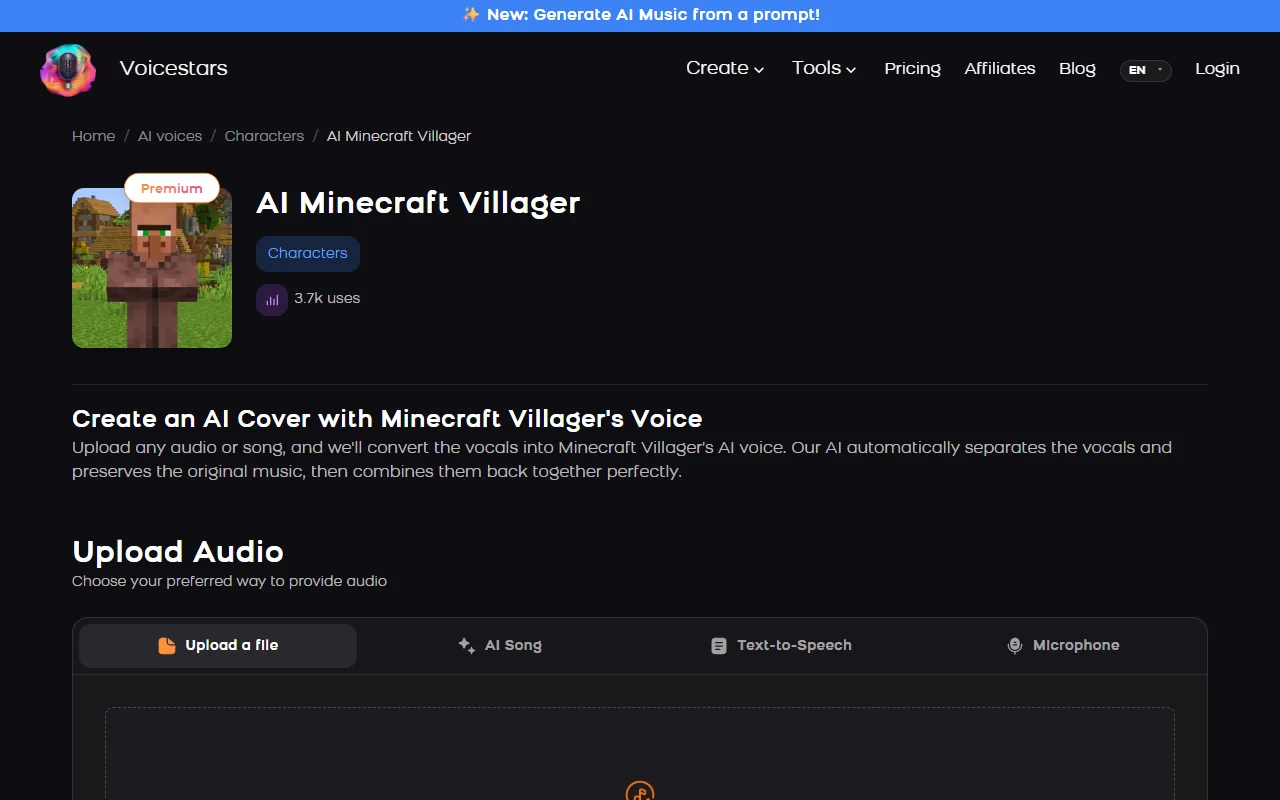
Each voice page takes four inputs: a file, an AI song, typed text or your microphone.
- Open the Minecraft Villager voice page and play the demo.
- Enter your line in the Text-to-Speech tab or upload a clean, dry take.
- Compare the result with the demo and label the clip as AI before sharing.
For live voice effects, read our gaming voice changer guide.
Before you share it
Minecraft is owned by Mojang; this guide is about fan content.
Use counts change daily.
How we made the examples
Tested and written by Big Jeezy, music producer, on 12 November 2026, using Voicestars and the tools named in this guide.
- The Voicestars AI Minecraft Villager voice page and the Minecraft Wiki villager page reviewed 19 November 2026; screenshots captured that day.
- Voice page check on 19 November 2026: the AI Minecraft Villager page showed 3.7k uses and four inputs (screenshot below).
- Villager sounds and professions from the Minecraft Wiki, read the same day.
Screenshots and examples come from these sessions. Voicestars publishes this guide and sells the voice tools it mentions.
Report a correction to Voicestars Editorial with the page, date, a short reproducible example and the observed result. Avoid sending private recordings. See our editorial policy.
Common questions
How do I get a Minecraft villager voice?
Type a short line on an AI Minecraft Villager voice page, or upload your own recording to convert it. On 19 November 2026 the Voicestars villager page showed 3.7k uses and four inputs: file, AI song, text and microphone.
Do Minecraft villagers really talk?
No. In the game, villagers only make “hmm” grunts, according to the Minecraft Wiki. A villager voice with words is a fan invention, which is why AI voices are popular for memes.
How many villager professions are there?
The Minecraft Wiki lists 13 professions, such as librarian, farmer and cleric, plus unemployed villagers and nitwits. Professions change the outfit, not the sound.
Can I make a villager sing?
Yes. Upload a song or a sung recording on the voice page to make a villager-style AI cover. Label it as AI and keep it non-commercial.
Can I use the villager voice in YouTube videos?
For fan content, yes, with the usual care: Minecraft belongs to Mojang, so keep it non-commercial fan use and describe the voice as AI-generated.
Why does my villager line sound unclear?
Long sentences and unusual words lose clarity in a nasal character voice. Keep lines short, write numbers as words and respell names phonetically.
Sources
Checked on 12 November 2026.
Read the Minecraft Wiki villager page and YouTube’s GenAI disclosure rules.