
How to use ttsMP3.com: voices, free limits and MP3 downloads

Published: · Updated:
Turn a short English script into a downloadable spoken MP3.
Choose the voice mode using its controls and daily allowance.
Follow our original script, interface capture and actual audio download.
Add a separate Voicestars music bed only if your project needs one.
Quick answer
ttsMP3.com converts written text into speech you can save as MP3. Choose a voice, paste your script, then use Read and Download as MP3. The provider currently lists up to 3,000 free characters daily for Regular Voices and 1,000 for AI Voices. These are character allowances, not guaranteed audio durations.
Choose the workflow
Match the input, output and constraints to your project. This table compares documented workflows; it is not a measured audio-quality ranking.
| Decision | Regular Voices | AI Voices |
|---|---|---|
| Free daily allowance | Up to 3,000 characters | Up to 1,000 characters |
| Language control | Select a language-specific speaker | Language detected from text |
| Delivery controls | Documented SSML controls | Speed and optional voice instructions |
| Breaks | Documented break tag | Whole seconds from 1 to 60 |
| Our evidence | English Kendra MP3 downloaded | Earlier German Alloy MP3 downloaded; no English AI comparison |
| Best starting point | A named accent or structured markup | Trying a described delivery style |
Evidence: ttsMP3 Regular Voices · ttsMP3 AI Voices · ttsMP3 FAQ · YouTube: Improving AI labels for viewers and creators · Voicestars song generator: public interface and FAQ · Voicestars Terms and Conditions
The seven-step process
- Open the official converter and confirm whether Regular Voices or AI Voices is active. Read Today’s use before pasting a long script.
- For the English example, select US English / Kendra in Regular Voices. A different speaker makes this a different listening comparison.
- Paste the exact short script below. Keep the first attempt short enough to correct names and numbers without consuming a large allowance.
- Use only documented markup. The one-second break is supported in both modes; other SSML controls are not automatically interchangeable.
- Click Read and wait for processing. Check that the counter changes and an audio result becomes available; avoid repeated clicks while processing.
- Listen specifically to Lara, 24 and the sentence boundary. Save any alternate spelling as a separate version so you know what changed.
- Click Download as MP3. Open the saved file separately and confirm the whole script is present before putting it into a video editor.
Our English conversion: Kendra, one script, one download
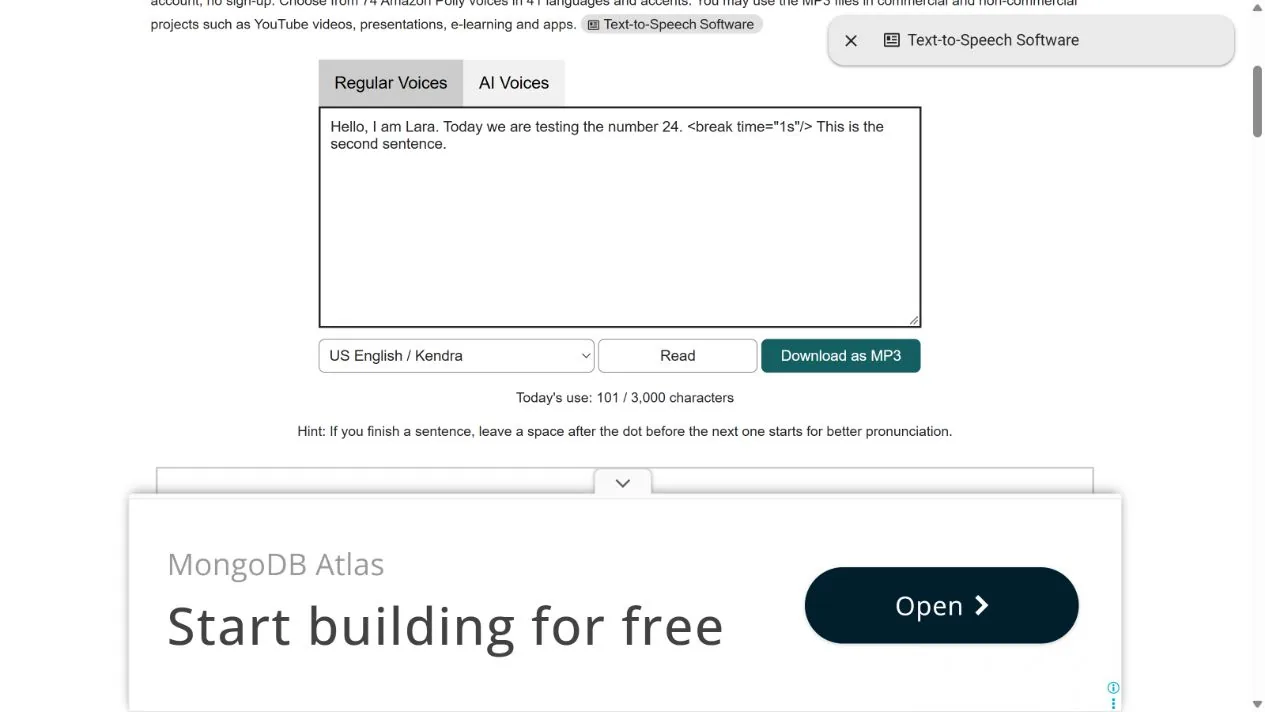
On 31 October 2026, a logged-out Regular Voices session processed this self-written script using the default US English / Kendra speaker. The visible counter moved from 0 to 101. We downloaded the resulting MP3. This proves this conversion and download worked in that session; it is not a pronunciation score or a measurement of the pause.
Hello, I am Lara. Today we are testing the number 24. <break time="1s"/> This is the second sentence.What to check
- Listen to the name and number against the printed script.
- Confirm that the second sentence is present in the downloaded file.
- Compare any revised version at a similar playback level; do not infer quality from file size.
Download the actual English test MP3 · Synthetic speech. Transcript: the exact script above.
Optional Voicestars tutorial: add music beneath your narration
Keep the ttsMP3 voice file as a separate track. Voicestars can supply a music layer for an explainer; it does not replace this text-to-speech workflow.
- Open the Voicestars AI Song Generator. Enter the prompt below into the main description field.
- Use Instrumental Only when the narration should be the only voice. Review the selected state before generating.
- Choose Create. In our logged-out check this led to Sign In; generation and downloads were not tested behind the account screen. Review account access and credit cost before proceeding.
- Once you have a result, import it below the narration in your editor. Reduce it until consonants remain clear on headphones and a phone speaker; trim the ending instead of assuming a requested length will be exact.
Example instrumental brief
Instrumental background for a spoken tutorial. Warm soft piano, light percussion, restrained energy, no singing, no spoken words, clean ending.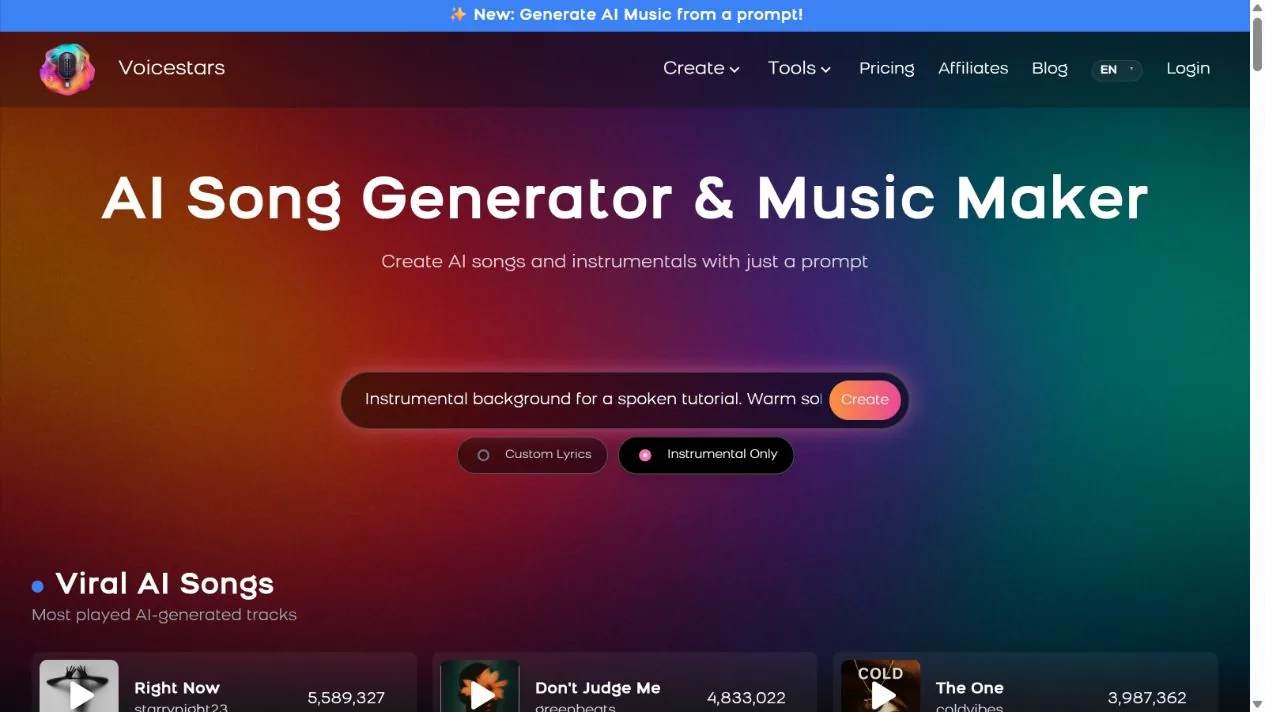
Choose controls before choosing a “natural” voice
A voice demo can help shortlist a speaker, but it does not tell you whether your product names, abbreviations or mixed-language sentences will work. Start with a representative sentence containing the words your audience must understand.
Regular Voices exposes language-specific speakers and documented SSML. AI Voices detects language from the input and offers instructions for delivery. An instruction is a request, not a reliable control over every phoneme. Keep the voice fixed while changing one variable at a time.
Source: ttsMP3 AI Voices · checked 31 October 2026.
Improve pronunciation without breaking the script
Write the number once as digits and once as words in two short trials. Compare the spoken result; a written rewrite may alter meaning, so retain the original transcript for subtitles and accessibility.
Separate the speaking script from stage directions. In AI mode, put delivery requests into Add Instructions rather than asking the voice to read them as narration. The AI page says active instructions can set speed to 1.0. For breaks, it documents whole seconds from 1 through 60; a value such as 1.5 is outside that documented range.
Plain: The appointment is at 24 North Road.
Alternative trial: The appointment is at twenty-four North Road.
AI instruction example: Read calmly and clearly. Keep the delivery conversational.
Source: ttsMP3 AI Voices · checked 31 October 2026.
Working with a different reading task? Read a Google Docs document aloud · Choose a British-accent voice

Diagnose a failed conversion in a useful order
First check the character allowance, then try one plain sentence with no tags. If that works, reintroduce markup one tag at a time. If it does not, the provider FAQ also identifies temporary speech-service failures as a possible cause.
If you can hear the preview but cannot find the file, use the browser download list and check its destination folder. A saved MP3 is the audio output; it is not an offline copy of the voice model. Keep a text copy so a service interruption does not lose your script.
- Wrong language: check the selected Regular speaker; in AI mode, test a full sentence rather than a short ambiguous name.
- Unexpected pacing: remove optional instructions, return to a baseline, then change only speed or wording.
- Incomplete output: compare the final sentence against the script and wait for processing to finish before downloading.
Source: ttsMP3 FAQ · checked 31 October 2026.
Publishing narration: usage permission and disclosure are separate
ttsMP3 says its generated MP3s can be used in commercial and non-commercial projects without mandatory credit. That permission covers its output under its stated terms, not a borrowed script, an unrelated song or another person’s identity.
Read the current AI-mode disclosure notice as well as the usage permission. For a video platform, review its disclosure flow at upload time. Background music and a synthetic narrator are separate production choices; neither proves the work is endorsed by a real person.
Source: ttsMP3 FAQ · checked 31 October 2026.
Recent source: what it changes for this workflow
“we still require creators to manually disclose when they use realistic AI”
YouTube announced more visible labels and automatic signals in May 2026. For this tutorial, the practical consequence is to review disclosure during upload rather than assume an MP3 download settles platform requirements. The announcement is about platform labeling, not a ttsMP3 quality endorsement.
Evidence, method and responsibility
Research and interface checks: 31 October 2026. Maintained by Voicestars Editorial under the Nolan Vale pen name. This role is not a claim of an independent qualification or an endorsement by the cited organizations.
- Completed: English Regular Voices conversion and MP3 download, original script and interface capture.
- Completed previously: German Regular and AI downloads; these do not establish an English voice comparison.
- Inspected: Voicestars prompt screen and logged-out Generate → Sign In path.
- Not measured: independent listening quality, exact break duration, premium plans or cross-device conversion performance.
We distinguish provider documentation, observed interface behavior and proposed exercises. Screenshots are our actual browser captures; a screenshot of a form does not prove audio quality. No invented measurements, reviewer credentials or user ratings are used.
Report a correction to Voicestars Editorial with the page, date, a short reproducible example and the observed result. Avoid sending private recordings. See our editorial policy.
Frequently asked questions
Is ttsMP3 free?
The public converters provide limited free use and MP3 downloads without sign-up. Regular and AI modes have different daily character allowances; free does not mean unlimited.
What are the current free limits?
The official pages list up to 3,000 characters daily in Regular mode and 1,000 in AI mode, checked 31 October 2026. Check the live Today’s use counter for your session.
Can I download an MP3 without an account?
Our English Regular-mode test did so. This is a documented observation from one session, not a guarantee of future availability.
Which voice did you test?
US English / Kendra in Regular Voices, using the exact script printed above. The downloadable English MP3 is that output.
Can I add pauses in AI mode?
Yes. The AI page documents break tags using whole seconds from 1 to 60. Do not assume every other Regular-mode SSML tag also works.
Can I change an AI voice’s pitch with SSML?
The AI documentation distinguishes its delivery instructions from the direct controls in Regular mode. Start with documented controls rather than transferring pitch markup untested.
Can I use the audio commercially?
ttsMP3 states that its MP3 outputs may be used commercially and without mandatory attribution. You still need permission for the text and any other materials in the project.
Why does conversion fail?
A quota issue, formatting problem or temporary provider failure may be involved. Try one short plain sentence, then add formatting back incrementally.
Can I download the voice model?
No. The FAQ distinguishes downloadable MP3 outputs from underlying voice models, which are not provided for offline use.
Where does Voicestars fit?
As an optional separate music layer beneath the finished narration. It is not presented here as a ttsMP3 speech converter.
Practical takeaway
For a short narration, choose the ttsMP3 mode by its controls, run a representative sentence and verify the saved MP3. Add music only when it helps the project; keep the speech intelligible and review publication permissions separately.
Sources and verification date
Consulted 31 October 2026. Provider terms and features can change. Research papers describe their own methods and do not certify these products.


