
FROM OUR BLOG
Top 7 Suno API Solutions for Developers (2026)
Apr 27, 2026

Introduction
The Suno API turns Suno AI's text-to-music engine into something you can actually build with. Drop in a prompt, get back a track. Want to extend a song, pull out the vocals, or auto-generate lyrics? It handles all of that — and unlike a lot of AI tools that look great in demos but fall apart under real usage, it holds up at production scale.
The harder question isn't whether to use it. It's which provider to go through. A handful of third-party platforms have built their own access layers on top of the Suno API, and they're not all the same. Pricing models differ, reliability varies, and some have bolted on extra features that may or may not be useful for what you're building. A few are music-focused; others are broad AI marketplaces where Suno is just one of many options.
We went through seven of them. Here's the honest version of what each one is actually like.
Website List
1. APIPASS
What is APIPASS
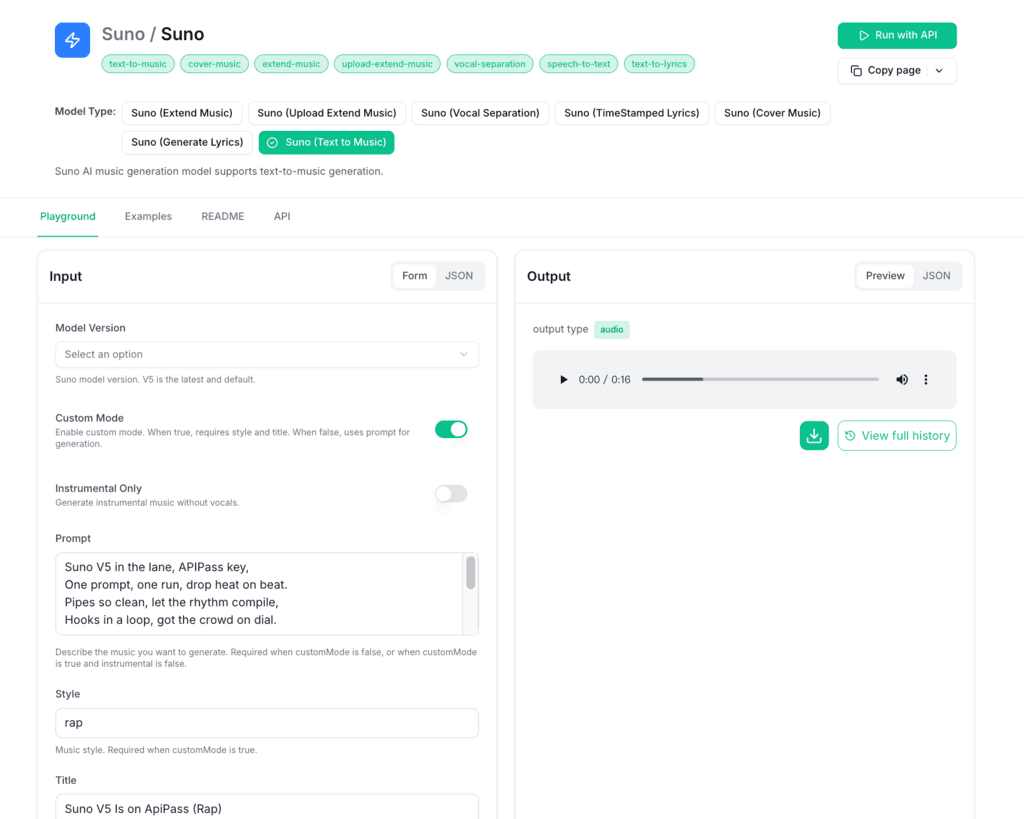
APIPASS is an API marketplace — one dashboard where you find, connect to, and manage a large number of APIs without keeping track of separate accounts. For music specifically, it gives you direct access to the Suno API, so you can wire the Suno AI Music Generator into your app — text-to-music, track extension, vocal separation, lyric generation — without dealing with provider auth or infrastructure yourself. If your project goes beyond audio (say, image generation alongside music), you can handle those integrations from the same place rather than bouncing between providers.
Features
Direct access to the Suno API and Suno AI Music Generator for music generation workflows
Unified marketplace covering thousands of APIs across different AI categories
Wide selection of current AI models for creative and operational use cases
Reliable performance and compatibility across supported integrations
Step-by-step documentation for straightforward onboarding
24/7 customer support for queries and troubleshooting
Pros and Cons
Pros:
One place to access the Suno API alongside thousands of other integrations
Faster to get up and running compared to direct API setup
Documentation is thorough across most supported APIs
Good model variety if your project covers more than music generation
Cons:
The volume of options can be disorienting for developers new to API marketplaces
Pricing and cost structure information could be more transparent
No offline API management functionality
Price
Text to Music: 2.5 credits per run (≈ $0.014) — covers Text to Music, Extend Music, Upload Extend Music, Cover Music, Generate Lyrics, and Vocal Separation
2. APIframe
What is APIframe
APIframe connects to Midjourney, Luma, Suno, and a handful of other AI media tools through one API. The idea is simple: if your project needs image, video, and music generation, you shouldn't have to maintain three separate integrations and subscriptions to get there. One endpoint, one billing relationship, everything in the same place. It's not the deepest tool for any single modality, but as a way to consolidate, it works.
Features
Single API access to multiple AI media models covering image, video, and music generation
Image synthesis with style controls for higher quality and creative output
Fast, scalable image generation for high-demand production use cases
Text rendering and typography support for complex visual content
Lightweight models available for low-latency applications
Pros and Cons
Pros:
Unified access to multiple AI media models through one integration
Strong image generation quality across supported styles and controls
Developer-friendly documentation for most implementation scenarios
Eliminates the need to maintain separate subscriptions for each AI media tool
Cons:
Access to multiple advanced models can get expensive depending on usage
Mobile app support and functionality details are limited
Requires internet connectivity — offline use is not supported
Price
Free: $0 — 20 credits, all Suno features, API access, webhook support, integrations
Basic Plan: $19/month — 1,000 credits/month, all Suno features, API access, webhook support, integrations
Starter Plan: $99/month — 5,500 credits/month, all Suno features, API access, webhook support, integrations
Growth Plan: $199/month — 12,000 credits/month, all Suno features, API access, webhook support, integrations
3. SunoAPI
What is SunoAPI
SunoAPI does one thing: music generation via API, fast and without watermarks. It covers both vocal and instrumental tracks, doesn't charge extra for commercial use, and the streaming output comes back in around 20 seconds. That last part is more useful than it sounds — if you're building anything where users expect near-immediate results, that turnaround matters.
Features
Streaming output delivering music generation results in as little as 20 seconds
Support for the latest AI music models for vocal and instrumental track creation
Watermark-free output ready for commercial use without additional fees
Multi-format downloads to suit different project requirements
Accessible pricing for creators and developers at different usage levels
Pros and Cons
Pros:
Watermark-free output ready for commercial projects
Fast streaming turnaround — results in approximately 20 seconds
Supports both vocal and instrumental track generation
Pricing is accessible across different usage levels
Cons:
Advanced customization and feature depth is limited compared to some alternatives
Performance can vary during periods of high demand
Integration with other tools may require some initial setup time
Price
Basic: $5 — 1,000 Credits
Standard: $50 — 10,000 Credits
Premium: $500 — 105,000 Credits
Enterprise: $1,250 — 275,000 Credits (5% off)
4. Replicate
What is Replicate
Replicate is a platform for running AI models through an API. The entry bar is low — one line of code gets a community model into production. But the more interesting part is fine-tuning: if the off-the-shelf models don't quite fit your use case, you can train on your own data directly on the platform. That's not something most inference APIs offer, and it's what separates Replicate from tools that are purely about running existing models.
Features
Deploy a model to production with a single line of code
Fine-tune models on your own data to improve performance for specific tasks
Large library of community-published, production-ready models
Flexible training options for image models including customized styles and outputs
Straightforward experimentation tools for iterating on results
Pros and Cons
Pros:
Simple to get started — basic model execution requires minimal code
Access to a large library of pre-existing, production-ready models
Fine-tuning on your own data is a real differentiator for specific use cases
Supports custom code deployments for more complex scenarios
Cons:
Advanced features have a meaningful learning curve
Some pre-trained models offer limited options for fine-tuning
Training and fine-tuning custom models can require significant compute resources
Price
$0.018 per run — Nvidia T4 GPU hardware, 79-second prediction time, open source and Docker compatible
5. EvoLink
What is EvoLink
EvoLink's main angle is price. It claims teams typically save 20–70% compared to going directly to individual AI providers, and it backs that with a 99.9% uptime commitment for production use. Chat, image, and video all run through the same API, with Nano Banana Pro and Seedream 4.0 available for more demanding workloads. If you're spending too much across multiple AI subscriptions and want to consolidate without downgrading reliability, this is worth looking at.
Features
Single EvoLink API integration for leading multimodal AI models across chat, image, and video
Pricing structured to undercut the cost of managing separate AI provider subscriptions
99.9% uptime SLA for production workloads
Advanced photo processing through Nano Banana Pro and Google Gemini integration
Seedream 4.0 for fast, coherent visual narrative generation
Pros and Cons
Pros:
Cost-effective access to top multimodal AI models through one integration
99.9% reliability for production workloads
Strong image and video editing capabilities
Pricing is structured to prevent overpaying for AI services
Cons:
Advanced features have a steeper learning curve for newer users
Some niche applications may hit customization limits
Occasional performance dips during peak usage periods
Price
Free Tier: Basic music generation, up to 5 songs per month
Suno V4 Beta: $0.118 per song (8 Credits)
Suno V4.5 Beta: $0.118 per song (8 Credits)
Suno V4.5 All Beta: $0.118 per song (8 Credits)
Suno V4.5 Plus Beta: $0.118 per song (8 Credits)
Suno V5 Beta: $0.118 per song (8 Credits)
6. API.box
What is API.box
API.box wraps the Suno AI API and adds a few practical features around it — vocal removal, AI lyrics with timestamps, WAV downloads. It's built to handle concurrent requests without falling over, which is the basic requirement for anything going into a real app. Setup is relatively straightforward, and the price point is reasonable for what you get. It won't win on raw customization, but for developers who just want something that works without a lot of configuration overhead, it covers the essentials.
Features
Text-to-music generation powered by the Suno AI API at a competitive price point
Stable, high-concurrency streaming performance for demanding workloads
Vocal removal, AI-generated lyrics, and timestamped lyric display included
Straightforward integration for websites, apps, and content tools
WAV format downloads for professional-grade audio output
Pros and Cons
Pros:
Economical pricing for AI music production
Fast streaming with reliable performance under high concurrency
Easy to integrate into existing applications and websites
Vocal removal and AI lyrics generation included out of the box
Cons:
Limited public information on long-term stability and uptime history
Requires internet connectivity — offline generation is not supported
Response times are slower than some competing platforms
Price
Basic: $5 — 1,000 Credits
Standard: $50 — 10,000 Credits
Premium: $500 — 105,000 Credits
Enterprise: $1,250 — 275,000 Credits
7. AIMLAPI
What is AIMLAPI
AIMLAPI gives you 400+ models through one API — chat, images, voice, video, music, all of it. The pitch is that you shouldn't have to maintain separate provider relationships for every modality your app touches. It also ships with moderation and safety tooling built in, which is less glamorous than the model count but genuinely useful if you're building something public-facing and need content controls you didn't have to wire together yourself.
Features
400+ AI models accessible through a single API endpoint
Music generation producing coherent multi-part tracks with vocals and arrangements
High-quality speech synthesis delivering polished, production-ready audio
Low-latency voice generation designed for real-time interactive environments
Strong safety and moderation tools for compliant content generation
Pros and Cons
Pros:
High-quality AI models covering multiple formats including chat, music, voice, and video
Music output emphasizes compositional depth and coherence across parts
Speech and music outputs are polished and production-ready
Transparent, competitive pricing across different usage levels
Cons:
Learning curve for users unfamiliar with advanced AI model features
Customization options may not cover all niche or specific use cases
Occasional performance issues during periods of high demand
Price
Pay As You Go: Prepaid $20 — access to all models, no usage caps, starts at 40M credits, crypto payments accepted, pay only for what you use, priority human support
Enterprise: Custom pricing — dedicated servers, custom/private models, unlimited RPM & TPM, extended data storage, shared Slack channel, full staff training and integration support
Key Takeaways
Music-focused platforms and general AI marketplaces solve different problems. Know which one you actually need before you start comparing pricing.
The cheapest per-run cost isn't always the best deal. Factor in rate limits, output quality, and what support actually looks like when something breaks.
Free tiers exist for a reason — use them. No amount of reading substitutes for running the API against your real workload.
Look for reviews that speak specifically to music generation quality, not just API reliability in general. They're different things.
How often a platform ships updates matters more than it might seem right now. The Suno API ecosystem moves fast, and providers that lag behind become a liability.
Support and documentation are easy to overlook until you're three days into a broken integration. Check both before you commit.
Pick for where your project will be in six months, not just where it is today. Switching providers mid-build is painful and rarely worth it.
Conclusion
The Suno API is a serious tool, and the provider you use to access it will shape your experience more than the marketing copy suggests. Price is part of it, but so are things like how stable the platform is under real traffic, how much room you have to control what the output sounds like, and what actually happens when you file a support ticket.
The seven options here each make different tradeoffs. Some are tightly focused on the Suno AI Music Generator and keep things simple. Others are broader platforms where music is one capability among many — which might suit you better if you're building something that spans multiple AI modalities. None of them are universally the best pick.
Try the free tiers against your actual use case. If you have edge cases that worry you, ask support about them before you commit. That's genuinely the fastest way to figure out which one you won't regret.


import StickyCTA from "https://framer.com/m/StickyCTA-oTce.js@Ywd2H0KGFiYPQhkS5HUJ"