
FROM OUR BLOG
What Is a Celebrity Voice AI Tool and How Does It Work?
Apr 10, 2026

Table of Contents
Quick Answer
What This Type of Voice Tool Does
Why So Many Creators Use Famous-Style Voice AI
What Makes the Output Sound Good
Step-by-Step Guide on How to Use Our AI Voice Cloning App
How to Get Better Results
Common Problems and How to Fix Them
Final Thoughts
FAQ
Related Readings
Quick Answer
A celebrity voice AI tool helps users create speech or singing that feels inspired by a well-known vocal style. People use these platforms for covers, parody content, creative demos, short-form videos, and experiments where a recognizable tone adds instant impact.
The best results rarely come from a one-click workflow. Strong output usually depends on clean source audio, short generation sections, clear performance direction, and realistic expectations. In many cases, the goal is not a perfect copy. It is a believable vocal result with the right tone, rhythm, pacing, and emotional energy.

What This Type of Voice Tool Does
These platforms are popular because they add personality to audio. A neutral synthetic voice can sound clean, but it often lacks identity. A recognizable vocal style changes that immediately. It gives a track, a joke, a short clip, or a demo a much stronger emotional signal, which is one reason so many creators keep experimenting with this category.
That does not mean the process is effortless. A good result depends on more than selecting a name from a library. Timing, diction, brightness, rhythm, and source quality all shape the final sound. The strongest outputs usually preserve character without collapsing into hollow textures, robotic phrasing, or brittle consonants.
This is why these tools appeal to such a wide range of creators. Some people use them for song covers. Others test alternate deliveries for hooks, skits, reaction content, narration, gaming edits, or meme formats. The actual use case changes, but the underlying need stays the same: they want a voice with more identity than a generic AI preset.
Why So Many Creators Use Famous-Style Voice AI
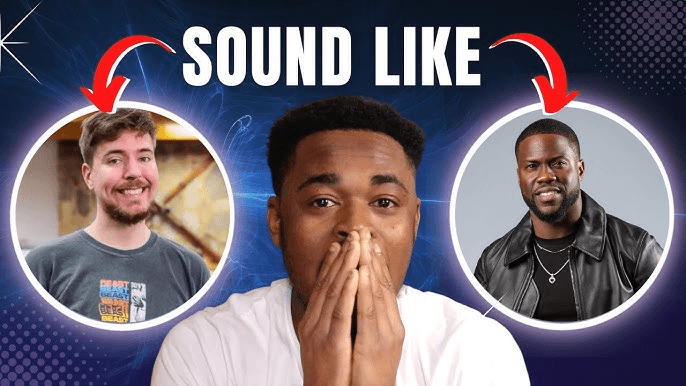
These tools are popular because they help content stand out fast. A familiar vocal style creates an instant reaction. The listener does not need much explanation to understand the reference, the mood, or the joke. That makes this format especially useful for short videos, social content, comedy clips, voice experiments, and song ideas that need immediate character.
They also work well for testing. A songwriter can check whether a hook sounds stronger with a smoother voice or a darker tone. A producer can compare different textures before moving to a final vocal session. A content creator can hear whether a dramatic delivery works better than a playful one. In all of these cases, the real value comes from comparison, not just novelty.
Another reason this category performs so well is flexibility. Most people do not stop after one attempt. They try several directions, compare results, and listen for the best fit. That is why a good platform matters. Tools that allow fast testing, multiple voice options, and repeated refinements tend to be much more useful than single-purpose generators.
What Makes the Output Sound Good
A convincing result depends on usability, not just resemblance. Similarity helps, but it is only one part of the equation. The output also needs stable timing, clear diction, balanced tone, and enough personality to sound intentional. If the voice is technically close but full of artifacts, clipped peaks, phasey texture, or awkward syllables, it will still feel weak.
Source quality plays a huge role. If the input audio is noisy, distorted, over-compressed, or full of bleed, the generated result usually inherits those problems. Poor stem separation can create hollow mids, unstable consonants, or unnatural tails. Weak gain staging can make the voice sound too harsh or too flat. That is why the best results usually begin with basic audio hygiene before any generation happens.
Prompting also matters. When the platform supports performance guidance, it helps to describe what the line should do instead of only naming a vocal style. Should it feel darker, brighter, more playful, more dramatic, more relaxed, or more intense? Should the hook hit harder than the verse? Should the last word stretch more? Those instructions give the system shape, which is often what turns a flat result into something useful.
Step-by-Step Guide: Create your favourite Ai voice with Voicestars AI
Video Guide
Written Guide
1. Visit the Voicestars Homepage
Go to Voicestars and click “Try now.”
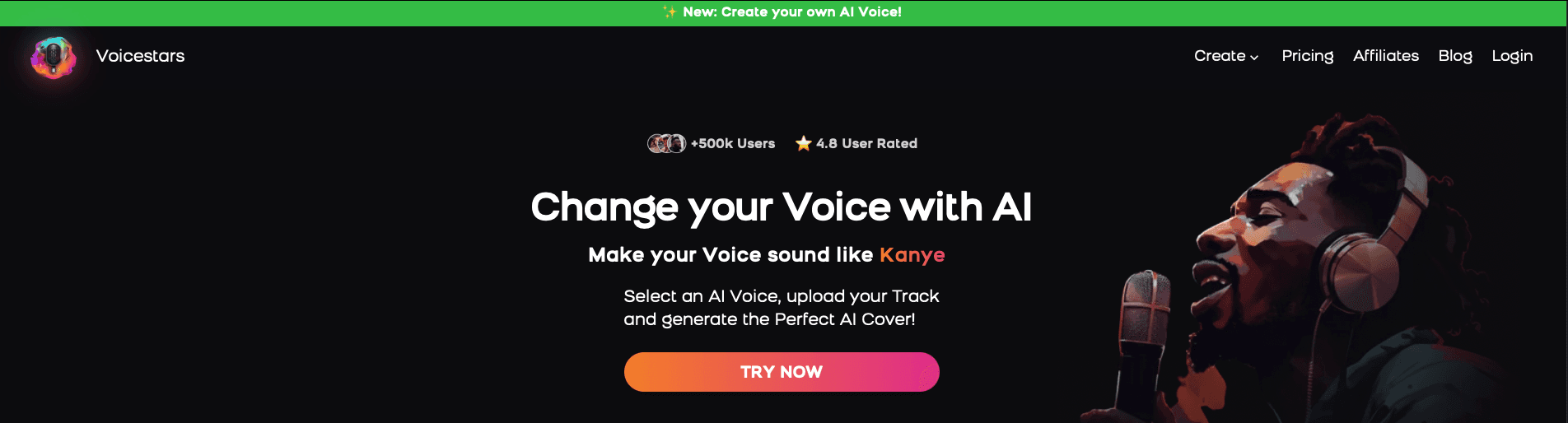
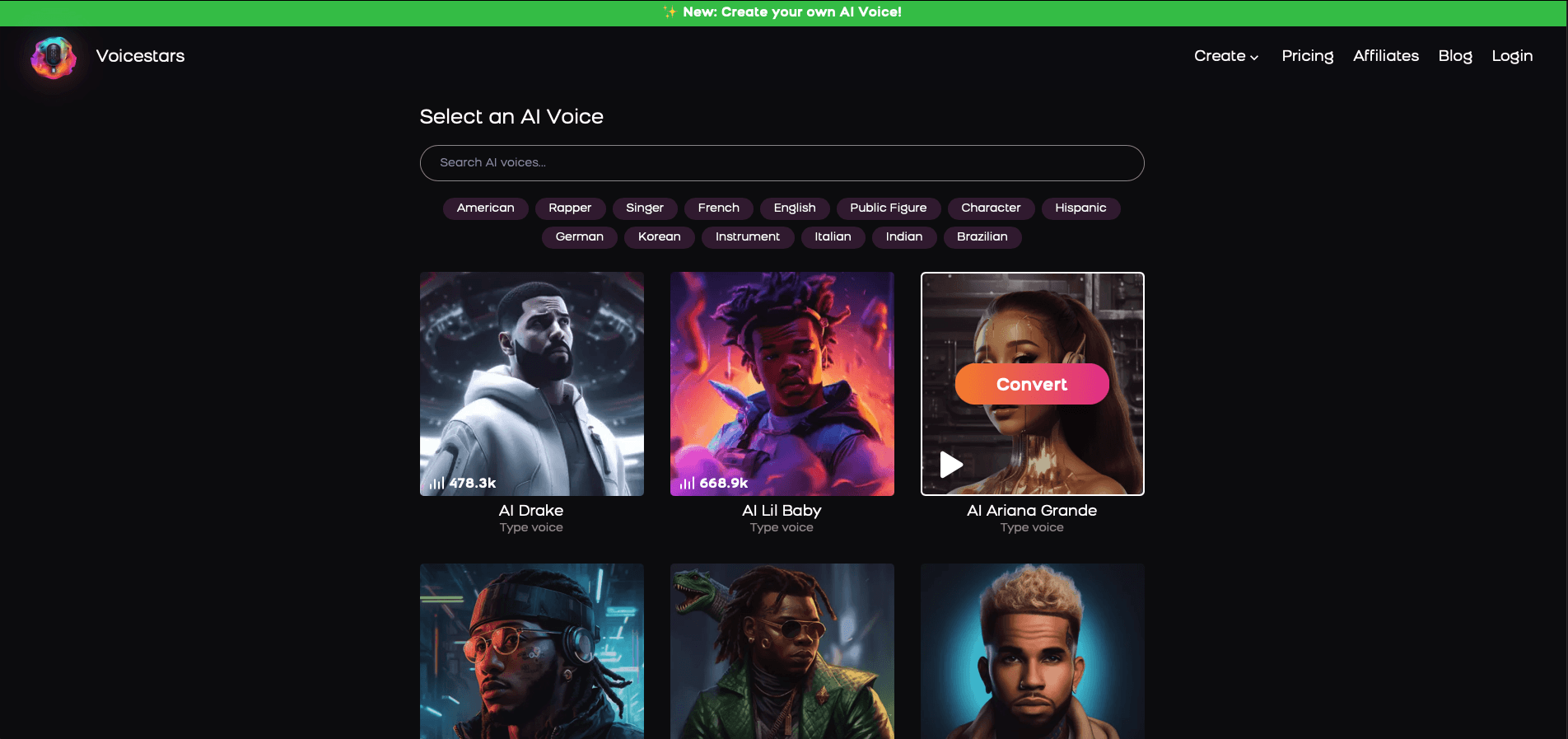
2. Select Your AI Voice or Track
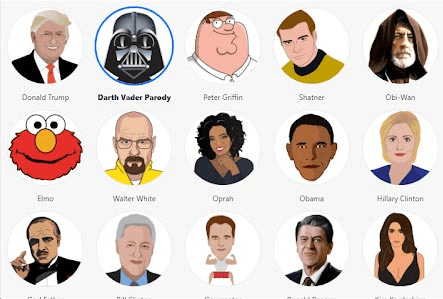
Choose from Bollywood stars, regional accents, or fictional voices.
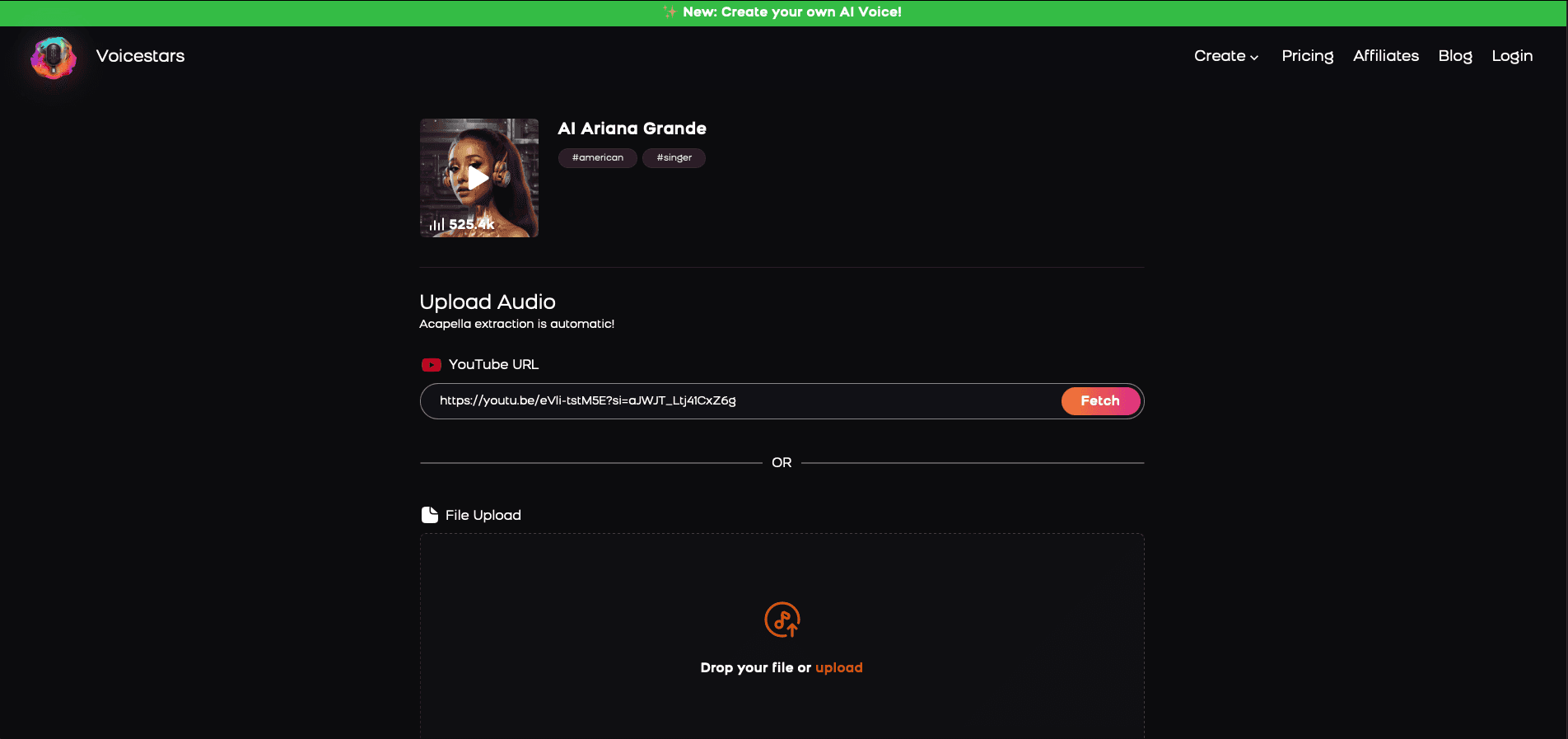
3. Upload a Song or Add Text for Remixing
Insert an audio clip or type song lyrics for a quick remix.
4. Share your AI cover with friends and enjoy your cover
Once the result is usable, listen again with production ears. Focus on line endings, breath flow, emotional rise, and whether the chorus actually feels bigger than the verse. Do not settle too early just because the output sounds technically acceptable. The most convincing takes usually come from refining a handful of weak lines, not from endlessly restarting the project. That is also where Voicestars becomes especially practical, because a fast workflow makes it easier to compare takes and improve specific moments without killing momentum.
How to Get Better Results
The easiest way to improve the output is to think in terms of performance rather than identity alone. Do not stop at selecting a famous vocal style. Decide what the line needs to do. Should it sound controlled, confident, playful, tense, dark, bright, or dramatic? Once the emotional role is clear, the output usually becomes much easier to guide.
The next improvement is technical. Keep the audio clean and work in short sections. Long generation blocks reduce control, especially when the content has fast phrasing or multiple emotional shifts. Smaller sections usually sound more consistent, and they are much easier to revise when a line feels weak.
Comparative testing also helps. A slightly less obvious voice may still work better because it handles rhythm more naturally or keeps better diction. Looking at adjacent voice styles can make those choices easier. For example, comparing guides related to Juice WRLD AI voice covers, Drake AI voice creation, Kanye AI voice workflows, or broader resources on celebrity-style AI voice platforms can help clarify whether you want a darker texture, smoother phrasing, or a more aggressive vocal color. It is also useful to compare pop-oriented references like Ariana Grande AI voice, Kendrick Lamar AI voice, Michael Jackson AI voice, and Sabrina Carpenter AI voice.
The last improvement is restraint. Many weak results fail because the creator pushes too hard. Overpacked lines, exaggerated prompts, harsh source files, and unnecessary effects can all make the output worse. A cleaner input and one clear creative direction usually go much further.
Common Problems and How to Fix Them
Some issues appear again and again when people work with famous-style voices. The good news is that most of them are easy to spot once you know what to listen for.
The most common problems
The output sounds robotic
This usually happens when the section is too long, the source audio is muddy, or the instructions are too vague. Shorter passages and cleaner input often improve the result immediately.The voice sounds too harsh
This often comes from clipped peaks, overly bright source material, or aggressive upper mids. A better-balanced file usually fixes a lot of that.The diction is hard to understand
Dense lyrics, rushed pacing, and weak stem separation can make the output blurry. Simplifying the line often helps.The performance feels flat
Even a technically accurate result can sound lifeless if it has no emotional arc. Clearer performance direction usually works better than endless rerenders.The chosen voice does not fit the content
A recognizable tone is not always the right one. Sometimes a less obvious match works better because it handles the rhythm or mood more naturally.There are strange artifacts in the audio
Hollow textures, unstable sustained notes, smeared consonants, or phasey tones usually point to poor preprocessing or low-quality source material.
The best way to fix these issues
A better workflow usually solves most of them:
use cleaner source audio
work in shorter sections
choose the voice for fit, not just recognition
give clear performance direction
regenerate only weak lines instead of rebuilding the whole project
That is usually what turns a fun test into something much more polished.
Final Thoughts
This kind of voice platform is most useful when it is treated as a creative production tool rather than a shortcut. The real goal is not simply to mimic a famous person. It is to create audio that lands faster, carries more identity, and gives you more room to test different tones, moods, and delivery styles.
The strongest results usually come from simple habits: clean the source, keep the sections short, guide the performance clearly, and judge the final audio honestly. That is what makes the result feel usable instead of gimmicky. A good platform can help, but the workflow behind it matters even more.
FAQ
1. What is a celebrity-style AI voice tool?
It is a platform that creates speech or singing inspired by a recognizable vocal style. People use it for covers, parody content, demos, short-form videos, and creative voice experiments.
2. Is it only useful for music?
No. Many creators use it for skits, reactions, narration, gaming clips, memes, and social content. Music is a major use case, but it is not the only one.
3. Do I need clean audio for good results?
Yes. Clean input usually makes a major difference. Noisy, distorted, or messy files tend to create weaker output with more artifacts.
4. Should I generate an entire track at once?
Usually no. Shorter sections are easier to control, easier to evaluate, and easier to fix.
5. Why does the output sometimes sound robotic?
This often happens because the section is too long, the instructions are vague, or the source audio is poor. Cleaner input and smaller sections usually help.
6. What makes one generated voice work better than another?
It is not only about resemblance. Timing, diction, tone, pacing, and emotional fit all matter. Sometimes the most usable result comes from a less obvious match.
7. Can I use this for original songs?
Yes. Many producers use these tools for demos, toplines, and arrangement testing before moving to a final recording.
8. What is the best way to choose a voice?
Choose based on the project’s tone and purpose. A familiar voice only helps if it actually fits the rhythm, mood, and structure of the content.
9. Why is the diction sometimes blurry?
Dense lines, weak stem separation, rushed phrasing, and poor source quality can all reduce clarity.
10. Can beginners get good results?
Yes. Beginners usually improve much faster when they start with short sections, clean audio, and a few voice comparisons.
11. Are these tools useful for short-form content?
Yes. Recognizable vocal styles create faster reactions, which makes them especially useful in short entertainment formats.
12. What technical issues should I listen for?
Pay attention to clipping, harsh highs, hollow textures, unstable consonants, phasey tones, and timing drift.
13. Does prompt quality really matter?
Yes. A vague instruction usually creates a vague result. Clear guidance makes the output sound more intentional.
14. Can one platform handle multiple voice workflows well?
Yes, especially when it lets you compare different tones quickly and refine only the sections that need work.
15. What is the fastest way to improve results?
Use cleaner audio, shorter sections, and more precise performance direction. Those changes usually improve quality the fastest.
Related Readings
Table of Contents
Quick Answer
What This Type of Voice Tool Does
Why So Many Creators Use Famous-Style Voice AI
What Makes the Output Sound Good
Step-by-Step Guide on How to Use Our AI Voice Cloning App
How to Get Better Results
Common Problems and How to Fix Them
Final Thoughts
FAQ
Related Readings
Quick Answer
A celebrity voice AI tool helps users create speech or singing that feels inspired by a well-known vocal style. People use these platforms for covers, parody content, creative demos, short-form videos, and experiments where a recognizable tone adds instant impact.
The best results rarely come from a one-click workflow. Strong output usually depends on clean source audio, short generation sections, clear performance direction, and realistic expectations. In many cases, the goal is not a perfect copy. It is a believable vocal result with the right tone, rhythm, pacing, and emotional energy.
What This Type of Voice Tool Does
These platforms are popular because they add personality to audio. A neutral synthetic voice can sound clean, but it often lacks identity. A recognizable vocal style changes that immediately. It gives a track, a joke, a short clip, or a demo a much stronger emotional signal, which is one reason so many creators keep experimenting with this category.
That does not mean the process is effortless. A good result depends on more than selecting a name from a library. Timing, diction, brightness, rhythm, and source quality all shape the final sound. The strongest outputs usually preserve character without collapsing into hollow textures, robotic phrasing, or brittle consonants.
This is why these tools appeal to such a wide range of creators. Some people use them for song covers. Others test alternate deliveries for hooks, skits, reaction content, narration, gaming edits, or meme formats. The actual use case changes, but the underlying need stays the same: they want a voice with more identity than a generic AI preset.
Why So Many Creators Use Famous-Style Voice AI
These tools are popular because they help content stand out fast. A familiar vocal style creates an instant reaction. The listener does not need much explanation to understand the reference, the mood, or the joke. That makes this format especially useful for short videos, social content, comedy clips, voice experiments, and song ideas that need immediate character.
They also work well for testing. A songwriter can check whether a hook sounds stronger with a smoother voice or a darker tone. A producer can compare different textures before moving to a final vocal session. A content creator can hear whether a dramatic delivery works better than a playful one. In all of these cases, the real value comes from comparison, not just novelty.
Another reason this category performs so well is flexibility. Most people do not stop after one attempt. They try several directions, compare results, and listen for the best fit. That is why a good platform matters. Tools that allow fast testing, multiple voice options, and repeated refinements tend to be much more useful than single-purpose generators.
What Makes the Output Sound Good
A convincing result depends on usability, not just resemblance. Similarity helps, but it is only one part of the equation. The output also needs stable timing, clear diction, balanced tone, and enough personality to sound intentional. If the voice is technically close but full of artifacts, clipped peaks, phasey texture, or awkward syllables, it will still feel weak.
Source quality plays a huge role. If the input audio is noisy, distorted, over-compressed, or full of bleed, the generated result usually inherits those problems. Poor stem separation can create hollow mids, unstable consonants, or unnatural tails. Weak gain staging can make the voice sound too harsh or too flat. That is why the best results usually begin with basic audio hygiene before any generation happens.
Prompting also matters. When the platform supports performance guidance, it helps to describe what the line should do instead of only naming a vocal style. Should it feel darker, brighter, more playful, more dramatic, more relaxed, or more intense? Should the hook hit harder than the verse? Should the last word stretch more? Those instructions give the system shape, which is often what turns a flat result into something useful.
Step-by-Step Guide: Create your favourite Ai voice with Voicestars AI
Video Guide
Written Guide
1. Visit the Voicestars Homepage
Go to Voicestars and click “Try now.”
2. Select Your AI Voice or Track
Choose from Bollywood stars, regional accents, or fictional voices.
3. Upload a Song or Add Text for Remixing
Insert an audio clip or type song lyrics for a quick remix.
4. Share your AI cover with friends and enjoy your cover
Once the result is usable, listen again with production ears. Focus on line endings, breath flow, emotional rise, and whether the chorus actually feels bigger than the verse. Do not settle too early just because the output sounds technically acceptable. The most convincing takes usually come from refining a handful of weak lines, not from endlessly restarting the project. That is also where Voicestars becomes especially practical, because a fast workflow makes it easier to compare takes and improve specific moments without killing momentum.
How to Get Better Results
The easiest way to improve the output is to think in terms of performance rather than identity alone. Do not stop at selecting a famous vocal style. Decide what the line needs to do. Should it sound controlled, confident, playful, tense, dark, bright, or dramatic? Once the emotional role is clear, the output usually becomes much easier to guide.
The next improvement is technical. Keep the audio clean and work in short sections. Long generation blocks reduce control, especially when the content has fast phrasing or multiple emotional shifts. Smaller sections usually sound more consistent, and they are much easier to revise when a line feels weak.
Comparative testing also helps. A slightly less obvious voice may still work better because it handles rhythm more naturally or keeps better diction. Looking at adjacent voice styles can make those choices easier. For example, comparing guides related to Juice WRLD AI voice covers, Drake AI voice creation, Kanye AI voice workflows, or broader resources on celebrity-style AI voice platforms can help clarify whether you want a darker texture, smoother phrasing, or a more aggressive vocal color. It is also useful to compare pop-oriented references like Ariana Grande AI voice, Kendrick Lamar AI voice, Michael Jackson AI voice, and Sabrina Carpenter AI voice.
The last improvement is restraint. Many weak results fail because the creator pushes too hard. Overpacked lines, exaggerated prompts, harsh source files, and unnecessary effects can all make the output worse. A cleaner input and one clear creative direction usually go much further.
Common Problems and How to Fix Them
Some issues appear again and again when people work with famous-style voices. The good news is that most of them are easy to spot once you know what to listen for.
The most common problems
The output sounds robotic
This usually happens when the section is too long, the source audio is muddy, or the instructions are too vague. Shorter passages and cleaner input often improve the result immediately.The voice sounds too harsh
This often comes from clipped peaks, overly bright source material, or aggressive upper mids. A better-balanced file usually fixes a lot of that.The diction is hard to understand
Dense lyrics, rushed pacing, and weak stem separation can make the output blurry. Simplifying the line often helps.The performance feels flat
Even a technically accurate result can sound lifeless if it has no emotional arc. Clearer performance direction usually works better than endless rerenders.The chosen voice does not fit the content
A recognizable tone is not always the right one. Sometimes a less obvious match works better because it handles the rhythm or mood more naturally.There are strange artifacts in the audio
Hollow textures, unstable sustained notes, smeared consonants, or phasey tones usually point to poor preprocessing or low-quality source material.
The best way to fix these issues
A better workflow usually solves most of them:
use cleaner source audio
work in shorter sections
choose the voice for fit, not just recognition
give clear performance direction
regenerate only weak lines instead of rebuilding the whole project
That is usually what turns a fun test into something much more polished.
Final Thoughts
This kind of voice platform is most useful when it is treated as a creative production tool rather than a shortcut. The real goal is not simply to mimic a famous person. It is to create audio that lands faster, carries more identity, and gives you more room to test different tones, moods, and delivery styles.
The strongest results usually come from simple habits: clean the source, keep the sections short, guide the performance clearly, and judge the final audio honestly. That is what makes the result feel usable instead of gimmicky. A good platform can help, but the workflow behind it matters even more.
FAQ
1. What is a celebrity-style AI voice tool?
It is a platform that creates speech or singing inspired by a recognizable vocal style. People use it for covers, parody content, demos, short-form videos, and creative voice experiments.
2. Is it only useful for music?
No. Many creators use it for skits, reactions, narration, gaming clips, memes, and social content. Music is a major use case, but it is not the only one.
3. Do I need clean audio for good results?
Yes. Clean input usually makes a major difference. Noisy, distorted, or messy files tend to create weaker output with more artifacts.
4. Should I generate an entire track at once?
Usually no. Shorter sections are easier to control, easier to evaluate, and easier to fix.
5. Why does the output sometimes sound robotic?
This often happens because the section is too long, the instructions are vague, or the source audio is poor. Cleaner input and smaller sections usually help.
6. What makes one generated voice work better than another?
It is not only about resemblance. Timing, diction, tone, pacing, and emotional fit all matter. Sometimes the most usable result comes from a less obvious match.
7. Can I use this for original songs?
Yes. Many producers use these tools for demos, toplines, and arrangement testing before moving to a final recording.
8. What is the best way to choose a voice?
Choose based on the project’s tone and purpose. A familiar voice only helps if it actually fits the rhythm, mood, and structure of the content.
9. Why is the diction sometimes blurry?
Dense lines, weak stem separation, rushed phrasing, and poor source quality can all reduce clarity.
10. Can beginners get good results?
Yes. Beginners usually improve much faster when they start with short sections, clean audio, and a few voice comparisons.
11. Are these tools useful for short-form content?
Yes. Recognizable vocal styles create faster reactions, which makes them especially useful in short entertainment formats.
12. What technical issues should I listen for?
Pay attention to clipping, harsh highs, hollow textures, unstable consonants, phasey tones, and timing drift.
13. Does prompt quality really matter?
Yes. A vague instruction usually creates a vague result. Clear guidance makes the output sound more intentional.
14. Can one platform handle multiple voice workflows well?
Yes, especially when it lets you compare different tones quickly and refine only the sections that need work.
15. What is the fastest way to improve results?
Use cleaner audio, shorter sections, and more precise performance direction. Those changes usually improve quality the fastest.
Related Readings


import StickyCTA from "https://framer.com/m/StickyCTA-oTce.js@Ywd2H0KGFiYPQhkS5HUJ"